


---------------(Lượt truy cập: 723)---------------
HTML Documents
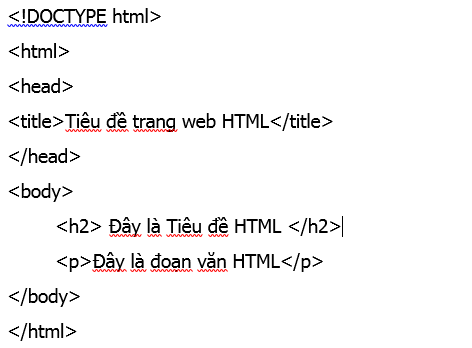
All HTML documents begin with the HTML DOCTYPE tag
The html tag is the starting and ending tag, only differing by the / character
The body tag is the tag that displays the main content of the html document
Note: All tags in HTML have 2 tags, starting and ending. The starting tag does not have the / character, the ending tag has the / character.
For example:
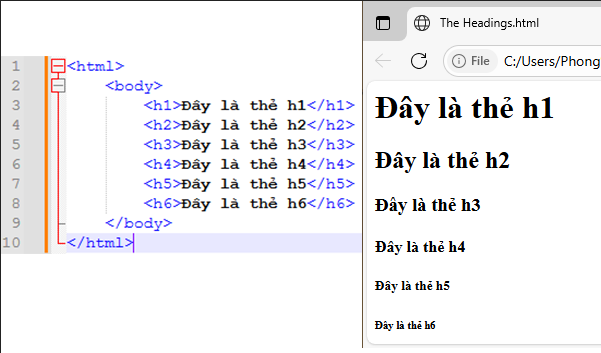
HTML Headings Tags : Headings
Headings are defined by h tags starting from h1 to h6. The h1 tag is the largest, the h6 tag is the smallest.
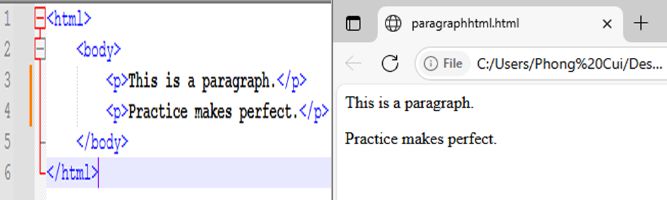
HTML Paragraphs - Paragraphs
The p tag is used to format an HTML paragraph.
For example:
a Tag - Link Tag In HTML
The a tag is a link tag in HTML.
For example:
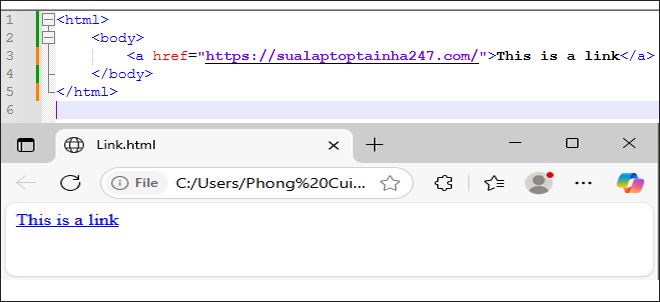
The HREF attribute specifies the link address, the text after the = sign is the address of the linked object (enclosed in ""). The text between the ampersands is the host object of the link. When you click on the host object in the Browser, you will be taken to the linked object.
img Tag - Image Tag In HTML
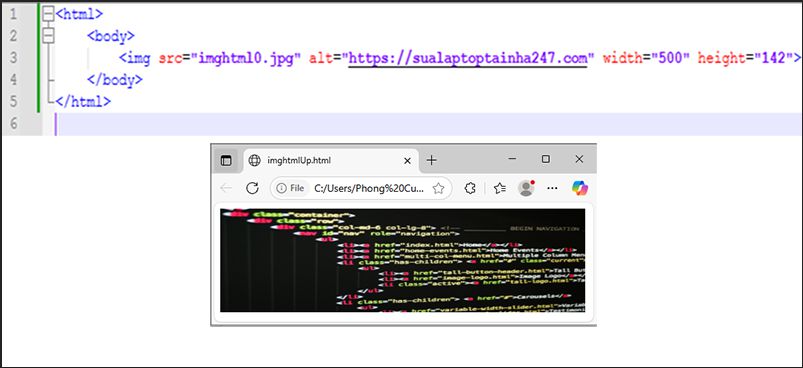
img Tag : HTML Image Tag
The img tag is used to define an HTML image.
The img tag has the following attributes:
- src : Specifies the address of the image file inserted into the Web page.
- alt : Alternative text.
- width : width of the image.
- height : height of the image.
How to view HTML source code: Press CTRL + U in the HTML page or right-click on the page and select "View page source" to open a new tab containing the HTML page source code.
Article edited and written by Le Thanh Phong - Wish You Success !!!
Other Posts
- Introduction What is HTML Programming Language? (23.05.2025)
- Main Elements of HTML (14.05.2025)
- Understanding HTML Editors (06.06.2025)